Z-Image Character Consistency: Multi-Turn Guide | Z Image Tutorial
Learn how to maintain character consistency across multiple images using Z-Image (Z Image) multi-turn conversation format. Define characters once, make precise edits while preserving details.
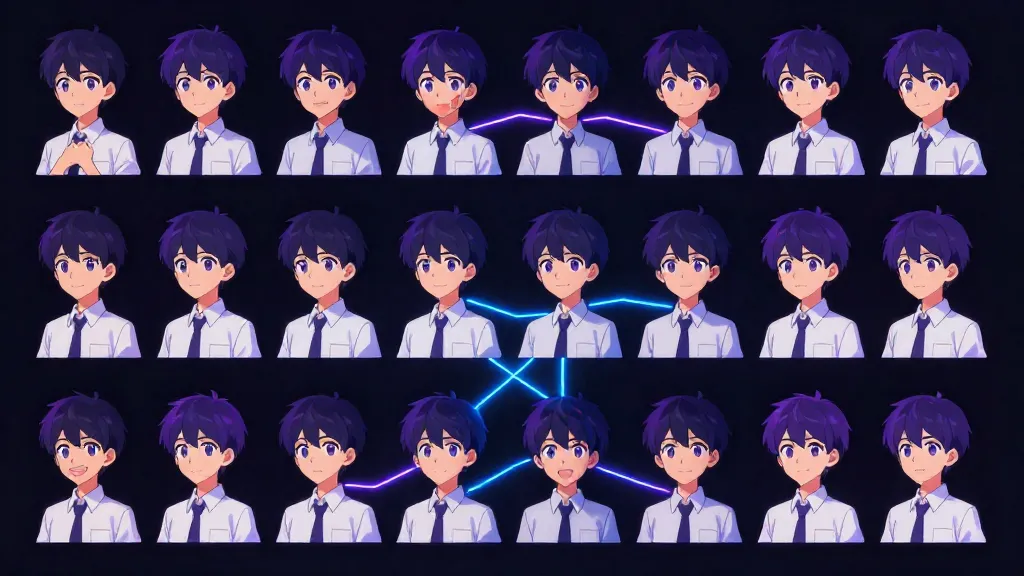
One of the biggest challenges in AI image generation is maintaining consistency across multiple images. Z-Image Turbo addresses this with its unique multi-turn conversation format.
This guide explains how to define characters once and make precise modifications while preserving their core identity.
Understanding Z-Image's Chat Format
The Qwen3-4B Foundation
Z-Image Turbo uses Qwen3-4B as its text encoder. This model was trained on conversations with a specific structure:
<|im_start|>system
Instructions for the model<|im_end|>
<|im_start|>user
The user's request<|im_end|>
<|im_start|>assistant
<think>
Model's reasoning process
</think>
Response to the user<|im_end|>
When you use Z-Image through its custom ComfyUI nodes, you can access this full structure.
Why This Matters for Consistency
The model was trained to:
- Follow system instructions throughout the conversation
- Remember context from previous turns
- Use
<think>blocks for reasoning about changes - Maintain consistency while making requested modifications
By structuring your prompts as multi-turn conversations, you give Z-Image explicit context about what should stay the same.
The Multi-Turn Workflow
Step 1: Define Your Character (First Turn)
Create a comprehensive character profile with every detail you want preserved:
# Character Profile: Sarah Chen

## Core Identity
- Name: Sarah Chen
- Age: 28
- Ethnicity: Chinese-American
- Build: Slim, 5'6"

## Face & Features
- Face Shape: Oval with high cheekbones
- Skin: Fair with warm undertones, light freckles across nose
- Eyes: Dark brown, almond-shaped, slight upturn at corners
- Eyebrows: Natural, slightly thick, well-groomed
- Nose: Small, slightly upturned
- Lips: Full, natural rose color
- Expression: Default confident half-smile

## Hair
- Color: Black with subtle warm brown highlights
- Length: Mid-back
- Style: Usually worn down, slight natural wave
- Texture: Thick, healthy, glossy

## Distinguishing Features
- Small beauty mark below right eye
- Delicate gold hoop earrings (always wears)
- Silver necklace with crescent moon pendant

## Default Attire
- Style: Modern professional, minimalist
- Colors: Often black, white, navy, burgundy
- Preference: Clean lines, quality fabrics
Step 2: First Image Generation
Use the full character sheet in your first prompt:
[System Prompt]
Generate a photorealistic portrait following the character sheet exactly.
Maintain all specified features and distinguishing marks.

[User Prompt]
# Character Profile: Sarah Chen
[Full character sheet from above]

Current scene: Professional headshot, studio setting, soft lighting

[Think Block]
Subject is Sarah Chen as defined in the character sheet. Key features
to ensure: high cheekbones, beauty mark below right eye, gold hoop
earrings, crescent moon pendant. Setting is studio, keep background
simple grey gradient. Lighting should be soft and flattering.

[Assistant Response]
Here's Sarah Chen's professional headshot as specified.
Step 3: Make Modifications (Second Turn)
Now request a specific change while referencing the established character:
[User Prompt]
Change the setting to a Tokyo street at night. Keep Sarah exactly
the same - her face, hair, earrings, necklace - but put her in
a casual outfit: black turtleneck and jeans.

[Think Block]
Preserve: Face shape, skin tone, freckles, eye shape, beauty mark,
earrings, necklace. Change: Setting to Tokyo night street, clothing
to casual black turtleneck and jeans. Add environmental lighting
from neon signs while maintaining face recognizability.

[Assistant Response]
Here's Sarah on a Tokyo street at night in casual wear.
ComfyUI Implementation
Required Nodes
ZImageTextEncoder
- Main node for first turn
- Inputs: system_prompt, user_prompt, thinking_content, assistant_content
- Outputs: conditioning, formatted_prompt, conversation
ZImageTurnBuilder
- Adds subsequent turns to conversation
- Inputs: previous (conversation), user_prompt, thinking_content
- Outputs: conditioning (when clip connected), conversation
Basic Workflow
CLIPLoader (Lumina 2)
       ↓
ZImageTextEncoder ──────────────────────→ KSampler
├── system_prompt: "Generate photorealistic..."
├── user_prompt: [Character sheet]
├── thinking_content: [Reasoning about features]
└── assistant_content: [Brief response]
Multi-Turn Workflow
ZImageTextEncoder (Turn 1: Character Definition)
       ↓ conversation
ZImageTurnBuilder (Turn 2: First Modification)
       ↓ conversation
ZImageTurnBuilder (Turn 3: Second Modification)
       ↓ conditioning
KSampler
Settings
| Parameter | Recommended Value |
|---|---|
| add_think_block | true |
| is_final (TurnBuilder) | true (on last turn) |
| template_preset | photorealistic or custom |
Complete Example: Walter Finch
Let's walk through creating a consistent character across multiple images.
Turn 1: Define Walter
System Prompt:
Generate an image in classic American comic book style.
Bold outlines, flat colors with halftone shading.
User Prompt:
# Character Profile: Walter Finch (Wally)

## Core Identity
- Name: Walter Finch (Nickname: Wally)
- Gender: Male
- Age: 72
- Ethnicity: Caucasian (British descent)
- Skin Tone: Fair, warm sun-kissed glow on cheeks and nose

## Head & Face
- Face Shape: Oval, prominent jawline, receding hairline
- Eye Color: Ice-blue with subtle gold flecks around the iris
- Hair: Pure white, side-parted, full beard and mustache
- Glasses: Thin, gold-rimmed reading glasses
- Expression: Warm, gentle smile with a twinkle in his eye

## Attire
- Light gray and blue checkered button-down shirt
- Dark grey wool trousers
- Brown leather loafers

## Props
- Pale lavender ceramic mug of coffee
- Gold pocket watch chain visible in breast pocket
Think Block:
Creating Walter "Wally" Finch: 72 years old, British descent,
warm grandfather type. Key features: ice-blue eyes with gold
flecks (distinctive), gold-rimmed glasses, full white beard
side-parted hair. Must include: lavender coffee mug and gold
pocket watch chain. Style: American comic book with halftone.
Assistant Response:
Here's Walter Finch, the kindly British gentleman.
Turn 2: Modify Beard Color
User Prompt:
Let's change his beard to have some red mixed in with the white.
Keep everything else exactly the same.
Think Block:
Modifying beard only: change from pure white to red and white
mixed. Preserve: ice-blue eyes with gold flecks, gold-rimmed
glasses, facial structure, lavender mug, pocket watch chain,
checkered shirt, warm expression.
Turn 3: Add New Element
User Prompt:
Let's put a cute baby flying sloth hovering above his head too.
Think Block:
Adding element: baby flying sloth above Walter's head. Preserve
all of Walter's features including the red-white beard from
previous turn. The sloth should be small and cute, floating
or hovering position.
Result
The final image contains Walter with all his defined features, the red-white beard modification from turn 2, and the flying sloth addition from turn 3.
Why Using Qwen3 for Prompt Generation Helps
Z-Image's encoder is Qwen3-4B. All Qwen3 models share the same tokenizer.
When you use a Qwen3 model to generate your character descriptions:
- Same vocabulary means same token IDs
- Semantic nuances transfer directly
- Think block reasoning primes the encoder
For best results, consider using Qwen3-72B or larger to generate detailed character sheets, then feed them directly to Z-Image.
Example Qwen3 System Prompt
You are a visual prompt engineer for Z-Image Turbo.

Generate detailed, visually-specific character descriptions.
Focus on concrete visual details - colors, textures, specific
features. Avoid abstract concepts.

Structure your output as:
1. <think> block with visual planning
2. Hierarchical character profile with sections

The output will be used directly as a Z-Image prompt.
Tips for Better Consistency
Be Exhaustively Specific
Don't leave anything to chance. If you want specific eye color, say exactly what it is. "Blue eyes" is vague. "Ice-blue with subtle gold flecks around the iris" is specific.
Use the Think Block
The think block lets you explicitly state what to preserve:
<think>
Changing: outfit to summer dress
Preserving: face shape, eye color (hazel with amber ring),
beauty mark on left cheek, ear piercings (two in left ear),
nose shape, lip fullness
</think>
One Change Per Turn
Don't overload modifications. Make one targeted change per turn:
Good:
- Turn 2: Change outfit
- Turn 3: Change background
- Turn 4: Add accessory
Risky:
- Turn 2: Change outfit AND background AND add accessory AND alter lighting
Reference Previous Content
In later turns, briefly reference what should stay:
Keep Sarah's face, hair, and jewelry exactly as before.
Only change her outfit to a red evening gown.
Consistent Style Markers
Keep style keywords consistent across all turns:
[Every turn ends with]
photorealistic, 8k, professional photography, shot on Canon EOS R5
Limitations & Expectations
What Works Well
- Preserving distinctive features (scars, beauty marks, eye color)
- Maintaining clothing style across scenes
- Keeping accessories consistent
- Changing backgrounds while preserving subject
What's Challenging
- Exact face reproduction (this isn't face-swap)
- Perfect consistency across wildly different poses
- Maintaining consistency across different art styles
Realistic Expectations
Multi-turn conversation improves consistency but doesn't guarantee perfection. Expect:
- 80-90% feature preservation with good prompting
- Occasional need for regeneration
- Better results with distinctive characters
Troubleshooting
Features Drifting
Problem: Character looks slightly different each generation.
Solution: Add more specific distinguishing features. Instead of "brown hair," use "chocolate brown hair with copper highlights, falling to mid-back, slight wave, side-parted."
Modifications Not Applying
Problem: Requested changes don't appear.
Solution: Be explicit in think block about what changes. State the change first, then list what stays the same.
Style Inconsistency
Problem: Art style changes between turns.
Solution: Include style keywords in system prompt and repeat them in each turn's assistant response.
Template Files
Z-Image includes 140+ templates in ComfyUI. For character work, try:
| Template | Best For |
|---|---|
| photorealistic | Realistic characters |
| character_design | Reference sheets |
| comic_american | Comic book style |
| anime_ghibli | Ghibli-style characters |
| portrait_studio | Studio portraits |
Access via template_preset in ZImageTextEncoder.
Get Started
- Download ComfyUI nodes: Comfy-Org/z_image_turbo
- Create a character sheet using the template above
- Start with Turn 1 - define everything
- Iterate with Turn 2+ - make targeted changes
Or practice basic prompting at z-image.vip.
References
Explore Z-Image at z-image.vip — free, unlimited.
Keep Reading
- Z-Image Prompt Engineering Masterclass — Visual vocabulary and formulas
- ComfyUI Custom Nodes Guide — Full node reference
- What is Z-Image Turbo? — Complete beginner's guide